Tab Employment - Maternity Protection / Parental Leave
In this section, future maternity protection or parental leave is maintained.
Naturally, maternity protection can only be saved for female employees. Parental leave can be saved, as required by law, for both female and male employees (paternal leave).
The periods of maternity protection and parental leave are calculated according to the expected date of birth entered.
These can also be automatically transferred to an employment entry by checking the "Create/update employment entry for maternity protection" checkbox.
Use Cases
The following use cases are possible:
- Maternity protection
- Maternity protection with subsequent parental leave
- Maternity protection with subsequent parental leave and a second part of parental leave
- Maternity protection with later parental leave
- Paternal leave (no planned date of birth, otherwise the protection periods would be checked)
For maternity protection, there are
- Registration with planned date of birth
- Notification of the actual date of birth and of the circumstances that determine the duration of maternity protection (multiple births, cesarean section, premature birth)
More detailed instructions can be found under Managing Parental Leave.
Information on the input fields can be found under Employment Field Index.
The form gives you the option of automatically creating entries that change the employment state from the entry of maternity protection or parental leave!
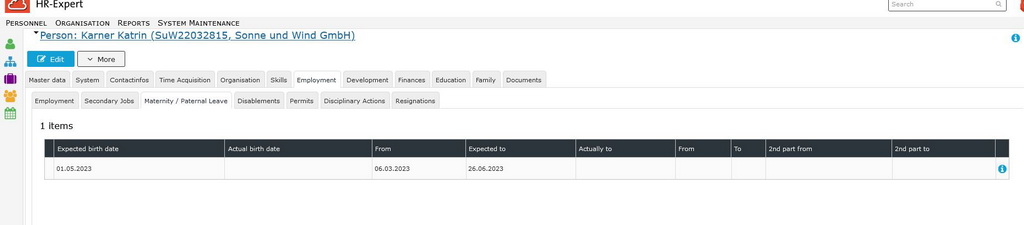
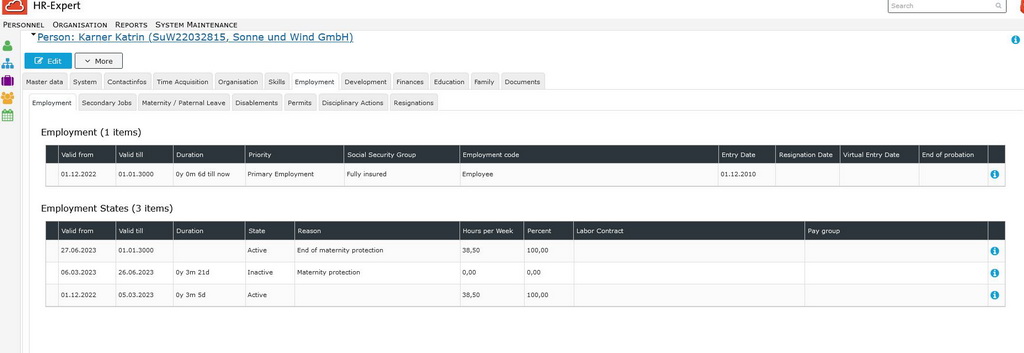
The following example shows how an expected date of birth is captured and how maternity protection is automatically created in the employment states (picture # 01) and what effect the capturing has on the Employment tab (picture # 02):
|
# 01 |
||
|---|---|---|
|
|
# 02 |
||
|---|---|---|
|
Keine Kommentare vorhanden.