Groups - Overview
[Note: the screenshots still contain the names "Organigram group" and "Loose groups" that were in use for organizational units and permission groups before July 2024.]
General
Under the menu item Groups you will find an overview of all groups (departments) created for your client (company).
If your organizational structure also includes locations and/or cost centers, these can also be found in this area by selecting the corresponding terms under "Organizational structure".
|
Name |
Description |
|---|---|
|
Short name |
the short name of the group including the prefix (must be unique!) |
|
Name |
the (long) name of the group |
|
Description |
optional description of the group |
|
Automatically add new persons? |
show all groups or select (Yes/No) |
|
Client |
the company for which the administration is performed here. |
|
Organizational structure |
Available options are "All", "Organizational units" and "Permission groups", or "Location" and/or "Cost center" |
|
Valid from/Valid to |
Start date and possible expiration date of the group (if not defined, automatically 01/01/3000) |
Sorting / search options
This list can be sorted using the small white triangles next to the column headings.
In addition, the white text fields at the beginning of the list let you restrict the displayed records by various criteria, e.g., entering "Linz" under Name shows only groups whose name contains "Linz" (in the example, a group from the organizational chart, a location and a cost center).
To do this, enter the search term in the text field and start the search with Enter / the Return key or by clicking the magnifying glass icon. To make all records visible again, simply delete the search term from the corresponding field and press Enter again or click the magnifying glass icon.
Practical functions
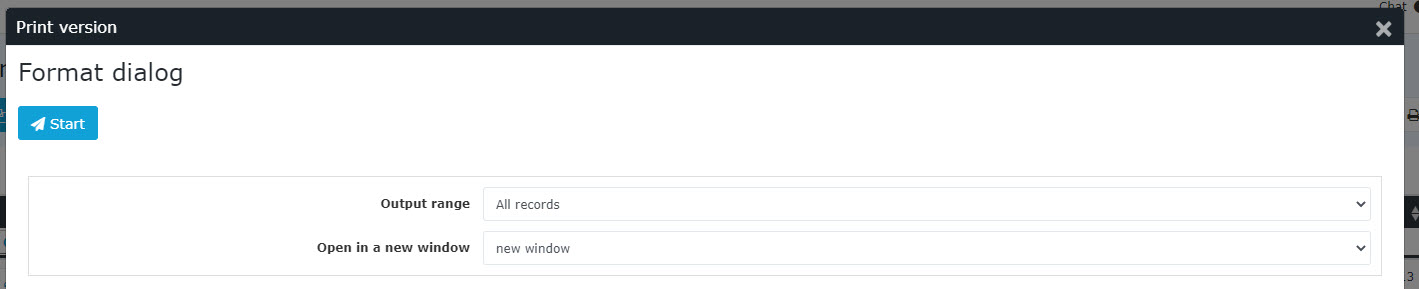
Clicking one of the 3 icons in the upper right area (Print, PDF, Excel) opens the following dialog box, where you can specify in more detail the data to be displayed in the selected medium (Print, PDF, Excel):
 |
| Vergrößern |
Output range
-
All records
All groups of the company are displayed in the selected output medium. -
Current selection
Only the currently displayed groups of the company are displayed in the selected output medium
Open in new window
-
New window
The selected records are displayed in a new window -
Current window
The selected records are displayed in the current window
This function is also handy if you want to export a list of groups, possibly filtered by various criteria. The Excel format is a good fit for this.
Keine Kommentare vorhanden.